



Postgresql Project With Procedures/Functions.
The objective of this project is to design PL/pgSQL procedures and functions that will enable a client to register new customers for their store.
Additionally, this project will allow existing customers to make purchases by specifying the products they want, along with their preferred delivery date and time. The system will ensure that a delivery can only be booked if both the product and the delivery slot are available.
Before we proceed, let's clarify the distinction between procedures and functions in PostgreSQL.
When I first started learning SQL, I found this distinction confusing. At the time, the best explanation I could come up with was that "procedures are functions that don't return values." While this isn't entirely accurate, it did help me grasp the basic idea.
In Postgresql, procedures and functions are similar but they are used differently. The most important differences to note are:
- Procedures do not return values but functions do. (Very important).
- Procedures are called used the CALL statement. For example, CALL update_payment(2, 100,000);
- While functions can be executed using the SELE CT statement.
Let's write some PGSQL code now.
-- Here we create 5 Tables.


DROP TABLE IF EXISTS Customer; --Drops the Customer table incase it already exists.
DROP TABLE IF EXISTS Transact; --Drops the Transact table incase it already exists.
DROP TABLE IF EXISTS Product; --Drops the Product table incase it already exists.
DROP TABLE IF EXISTS Warehouse_Item; --Drops the Warehouse_Item table incase it already exists.
DROP TABLE IF EXISTS Store; --Drops the Store table incase it already exists.
DROP TABLE IF EXISTS Bank; --Drops the Store table incase it already exists.


CREATE TABLE Customer (
	Customer_id VARCHAR(3) PRIMARY KEY, -- This table uses Customer ID as the primary key, a unique identifier for each customer, limited to 3 characters.
	Customer_first_name VARCHAR(20) NOT NULL, --First name of the customer, cannot be empty and is limited to 20 characters.
	Customer_Sname VARCHAR(20) NOT NULL, --Surname of the customer, cannot be empty and is limited to 20 characters.
	Customer_Address VARCHAR(50), --Address of the customer, limited to 50 characters.
	Customer_Phone_No VARCHAR(14) --Phone Number of the customer, limited to 14 characters.
);


CREATE TABLE Bank (
	Account_Number INTEGER PRIMARY KEY,
	Customer_id VARCHAR(3), -- This table uses Customer ID as the primary key, a unique identifier for each customer, limited to 3 characters.
    Bank_Name VARCHAR(15),-- This is the name of the Bank
    Bank_address VARCHAR(50), -- This will be the Bank address
    Sort_Code INTEGER, -- This is the Bank's sort code
    CONSTRAINT FK_Bank_Customer  --This is the constraint key
    FOREIGN KEY (Customer_id) REFERENCES Customer(Customer_id) -- assings Customer_ID as a Foreign key and references the Customer table
);


CREATE TABLE Transact (
	Transaction_ID VARCHAR(10) PRIMARY KEY, -- Transaction_ID as the primary key, a unique identifier for each Transaction, limited to 10 characters
	Customer_ID VARCHAR(3),-- A reference to the Customer Table, limited to 3 characters.
	DateTime TIMESTAMP, -- The date and time of trandsactions.
	CONSTRAINT FK_Customer -- Creates a foreign key
	FOREIGN KEY (Customer_id) -- Sets the Foreign Key, relates Customer_ID to the Customer table's Customer_ID
	REFERENCES Customer(Customer_id) -- References the CustomerID on the Customer table.

);

CREATE TABLE Product (
	ProductID VARCHAR(10) PRIMARY KEY, -- ProductID as the primary key, a unique identifier for each Product, limited to 10 characters
	Transaction_ID VARCHAR(10), --A reference to the Transact Table, limited to 10 characters.
	Product_Name VARCHAR(20) NOT NULL, --Name of the product
	Product_Description TEXT,--This should be a text value and provide the description of the product
	CONSTRAINT FK_Transact -- Creates a foreign key constraint
	FOREIGN KEY (Transaction_ID) -- Sets the Foreign Key, relates Transaction_ID to the Transact table's Transaction_ID
	REFERENCES Transact(Transaction_ID) -- References the Transaction_ID on the Transact table.
);

CREATE TABLE Warehouse_Item (
    Warehouse_ItemID VARCHAR(10) PRIMARY KEY, -- Warehouse_ItemID as the primary key, a unique identifier for each Warehouse Item, limited to 10 characters
    ProductID VARCHAR(10), --A reference to the Product Table, limited to 10 characters.
    DateTime TIMESTAMP, --Timestamp value of the date time.
	CONSTRAINT FK_Product -- Creates a foreign key constraint
	FOREIGN KEY (ProductID)  -- Sets the Foreign Key, relates Transaction_ID to the Transact table's Transaction_ID
	REFERENCES Product(ProductID) ---- References the ProductID on the Product table.
);

CREATE TABLE Store (
    StoreID VARCHAR(10) PRIMARY KEY, -- StoreID as the primary key, a unique identifier for each Store, limited to 10 characters
    Warehouse_ItemID VARCHAR (10), --A reference to the WarehouseItem Table, limited to 10 characters.
	CONSTRAINT FK_Warehouse_Item -- Creates a foreign key constraint
	FOREIGN KEY (Warehouse_ItemID) --Sets the Foreign Key, relates Warehouse_ItemID to the Warehouse_Item table's Warehouse_ItemID
	REFERENCES Warehouse_Item(Warehouse_ItemID) -- References the Warehouse_ItemID on the Warehouse_Item table.
);


-- Now we insert values into the tables that we have created.


INSERT INTO Customer (Customer_id, Customer_first_name, Customer_Sname, Customer_Address, Customer_Phone_No) --Inserts the following details into the Customer Table. Customer_id, Customer_first_name, Customer_Sname, Customer_Address, Customer_Phone_No
VALUES ('001', 'James', 'Mankind', 'Rollie Avenue', '+44035943482'), --Values inserted according to Customer_id, Customer_first_name, Customer_Sname, Customer_Address, Customer_Phone_No,
('002', 'John', 'Adam', 'Pizza Str', '+44035324532'),
('003', 'Jack', 'Donald', 'Peterson Drive', '+440423432482'),
('004', 'Ben', 'Peter', 'Wheels and More Avenue', '+4405435435435'),
('005', 'Anderson', 'Greg', 'Wall Str', '+4402432423324'),
('006', 'Phil', 'George', '103 Parks', '+4406752347543'),
('007', 'Mark', 'Matt', 'Jacklin Drive', '+44035437753');


INSERT INTO Bank (Account_Number, Customer_id, Bank_Name, Bank_address, Sort_Code)
VALUES  -- Values here are assigned randomly in the order of the details above
(12349012, '001', 'HSBC', 'Croydon Str', 1256),
(23450123, '002', 'NATIONAL BANK', 'Mao Vanue', 2567),
(34561234, '003', 'CETM BANK', 'Madis Street', 3478),
(45672345, '004', 'BANK OF ALL', 'Jackson Ave', 4589),
(56783456, '005', 'SUNDERLAND BANK', 'Palioma ave', 5890),
(67894567, '006', 'LONDON BANK', 'Peterson Str', 6781),
(78905678, '007', 'BANK OF ENGLAND', 'Jack Boulevard', 7012);


INSERT INTO Transact (Transaction_ID, Customer_id, DateTime)  --Inserts the following details into the Transact Table.
VALUES ('0043432', '001', '2023-12-22'), --Values inserted according to Transaction_ID, Customer_id, DateTime
('0143432', '002', '2023-12-23'),
('0243442', '003', '2023-12-24'),
('0343532', '004', '2023-12-25'),
('0443462', '005', '2023-12-26'),
('0543492', '006', '2023-12-27'),
('0434933', '007', '2023-12-28');

INSERT INTO Product(ProductID, Transaction_ID, Product_Name, Product_Description)  --Inserts the following details into the Product Table.
VALUES ('11953930', '0043432', 'CETM75', 'Good style of teaching'), --Values inserted according to ProductID, Transaction_ID, Product_Name, Product_Description
('12953932', '0143432', 'CETM76', 'Detailed style of teaching'),
('13953940', '0243442', 'CETM77', 'Well detailed style of teaching'),
('14953950', '0343532', 'CETM78', 'Interesting style of teaching'),
('15953960', '0443462', 'CETM79', 'Great style of teaching'),
('16953970', '0543492', 'CETM80', 'Easy style of teaching'),
('17453586', '0434933', 'CETM81', 'Interesting Course');


INSERT INTO Warehouse_Item (Warehouse_ItemID, ProductID, DateTime)  --Inserts the following details into the Warehouse_Item Table.
VALUES ('1143432', '11953930', '2023-12-23'), --Values inserted according to Warehouse_ItemID, ProductID, DateTime
('1243432', '12953932', '2023-12-24'),
('1343432', '13953940', '2023-12-25'),
('1443432', '14953950', '2023-12-26'),
('1543432', '15953960', '2023-12-27'),
('1643432', '16953970', '2023-12-28'),
('174654', '17453586', '2023-12-29');

INSERT INTO Store (StoreID, Warehouse_ItemID)  --Inserts the following details into the Store Table.
VALUES ('113454325', '1143432'), --Values inserted according to StoreID, Warehouse_ItemID
('123454325', '1243432'),
('133454325', '1343432'),
('143454325', '1443432'),
('153454325', '1543432'),
('163454325', '1643432'),
('174543545', '174654');
In the above code, we created different tables and were able to insert random values into these tables.
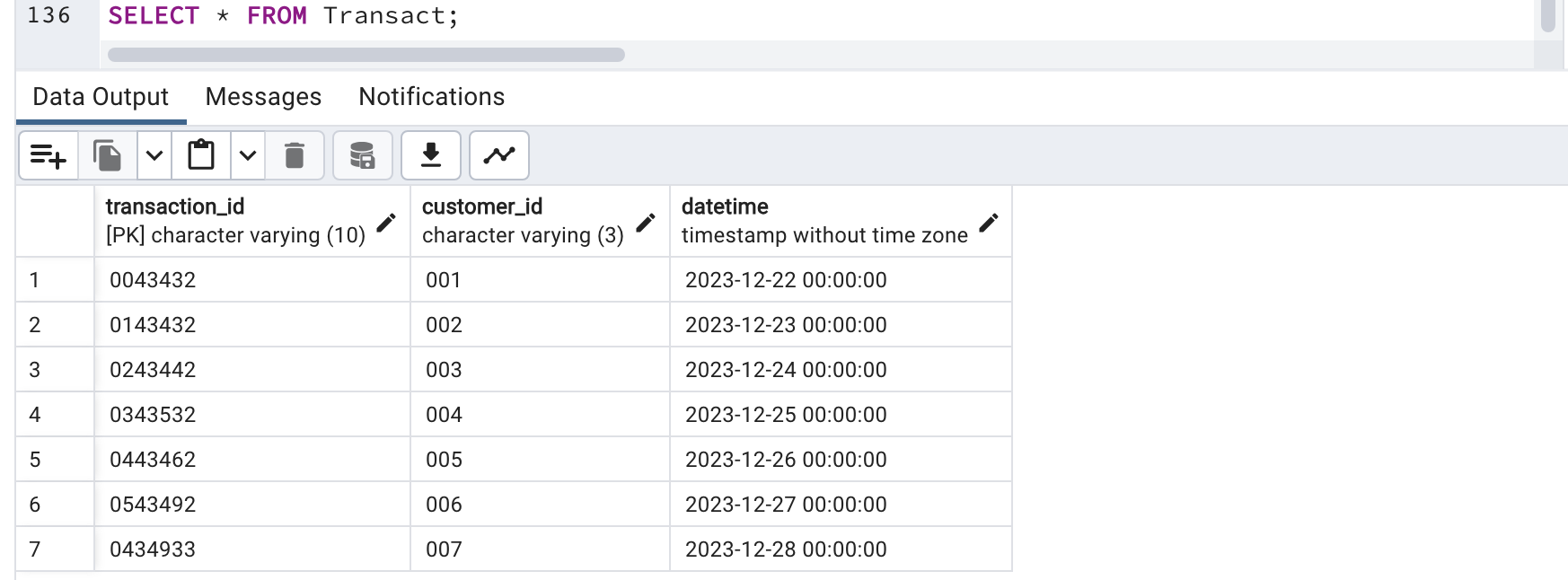
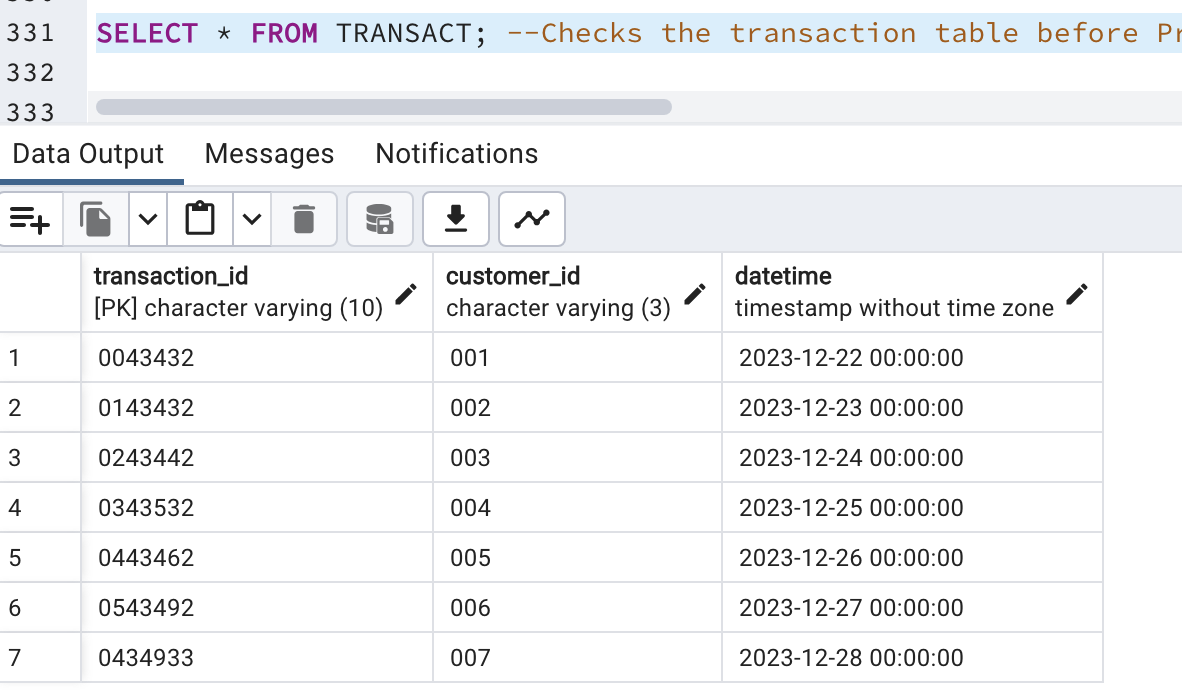
To view a table, let's say the transact table. We use SELECT * FROM Transact:
The same can be done to other tables.
The next step is to create a procedure which allows customer registration with details such as ID, first name, surname, adress, phone number, account number, bank name, bank address and sort code.
DROP PROCEDURE IF EXISTS customer_registration(VARCHAR, VARCHAR, VARCHAR, VARCHAR, VARCHAR, INT, VARCHAR, VARCHAR, INT);
--Creates a procedure below for Customer registration
CREATE OR REPLACE PROCEDURE customer_registration(
    cust_Id VARCHAR, -- User's registration CustomerID
    firstName VARCHAR, -- User's registration firstname
    surName VARCHAR, -- User's registration
    address VARCHAR, -- User's registration address
    phoneNo VARCHAR, -- User's registration Phone Number
	Account_Number INTEGER, --User's Account number
	Bank_Name VARCHAR, -- User's Bank Name
	Bank_address VARCHAR, -- User's Bank Address
	Sort_Code INTEGER  -- User's Sort Code
) as $$
BEGIN
	--Ensures none of the input detail is empty.
	IF (firstName = '' OR surName = '' OR cust_Id = '' OR address = '' OR phoneNo = '') THEN
        RAISE EXCEPTION 'These fields cannot be empty';
    END IF; --ends the if statement

	IF EXISTS (SELECT 1 FROM Customer WHERE Customer_id = cust_Id) THEN
        RAISE EXCEPTION 'Custom Exception: This Customer ID Already Exists';
    END IF; --ensures the customerID does not already exist.


    -- Raises an exception when a customer's firstname and surname already exists in the table. Supposing that no two customers should have same firstname and surname
    IF EXISTS (SELECT * FROM Customer WHERE Customer_first_name = firstName AND Customer_Sname = surName) THEN
        RAISE EXCEPTION 'This Customer Already Exists';
    ELSE -- If there is no exception, insert the values below into the relevant columns in the Customer table
        INSERT INTO Customer(Customer_id, Customer_first_name, Customer_Sname, Customer_Address, Customer_Phone_No)
        VALUES (cust_Id, firstName, surName, address, phoneNo);

		INSERT INTO Bank(Account_Number, Customer_id, Bank_Name, Bank_address, Sort_Code)
        VALUES (Account_Number, cust_Id, Bank_Name, Bank_address, Sort_Code);


    END IF; --Ends the if statement

EXCEPTION -- if there are other exceptions then start the exception block
    WHEN SQLSTATE '23505' THEN
        RAISE EXCEPTION 'A duplicate value already exists in the database.'; --captures the 23505 error
    WHEN SQLSTATE '22007' THEN
        RAISE EXCEPTION 'Invalid date format provided.'; --captures the 22007 error
    WHEN others THEN
        RAISE EXCEPTION 'An unexpected error occurred: %', SQLERRM; --captures other errors
END; --Ends the  block
$$ LANGUAGE plpgsql;
Noe let's test our registration procedure by registering some users. .
The first call will throw an exception because the ID already exists.
The second call will also throw an error because of the empty address.
The third call will work as it satisfies every condition.
--Exception Handling Trying to Register With One of The ID's
CALL customer_registration('002', 'Manus', 'Ahmed', 'No. 12 Croydon Str, London','+44898349823', 03495023, 'New Input Bank', 'New Input Avenue', 010345 ) -- call registration procedure with values

--Exception Handling Trying to Register with an empty address.
CALL customer_registration('045', 'Manus', 'Ahmed', '','+44898349823', 03495023, 'New Input Bank', 'New Input Avenue', 010345 ) -- call registration procedure with values

--Registering Customer's detail.
CALL customer_registration('045', 'Manus', 'Ahmed', 'No. 12 Croydon Str, London','+44898349823', 03495023, 'New Input Bank', 'New Input Avenue', 010345 ) -- call registration procedure with values


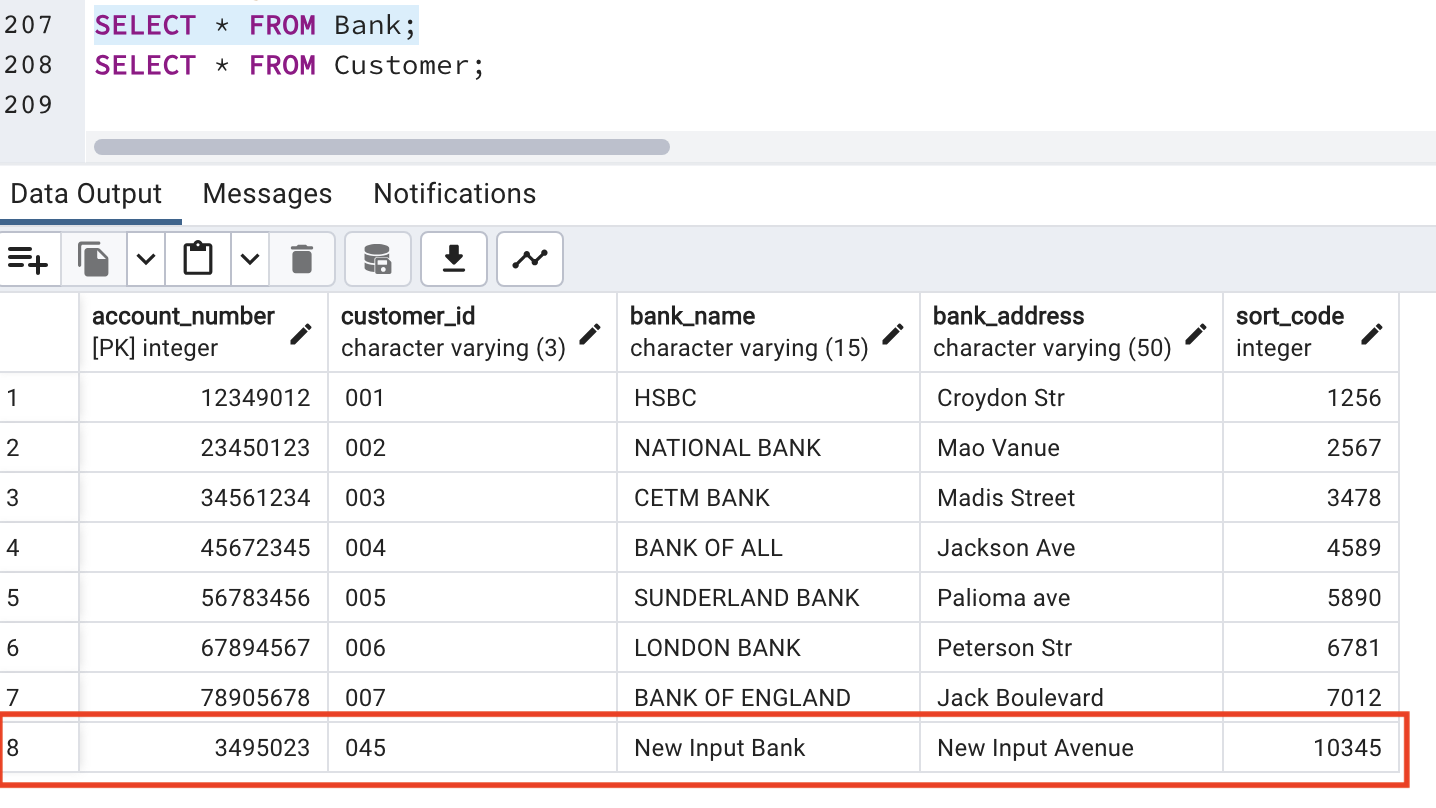
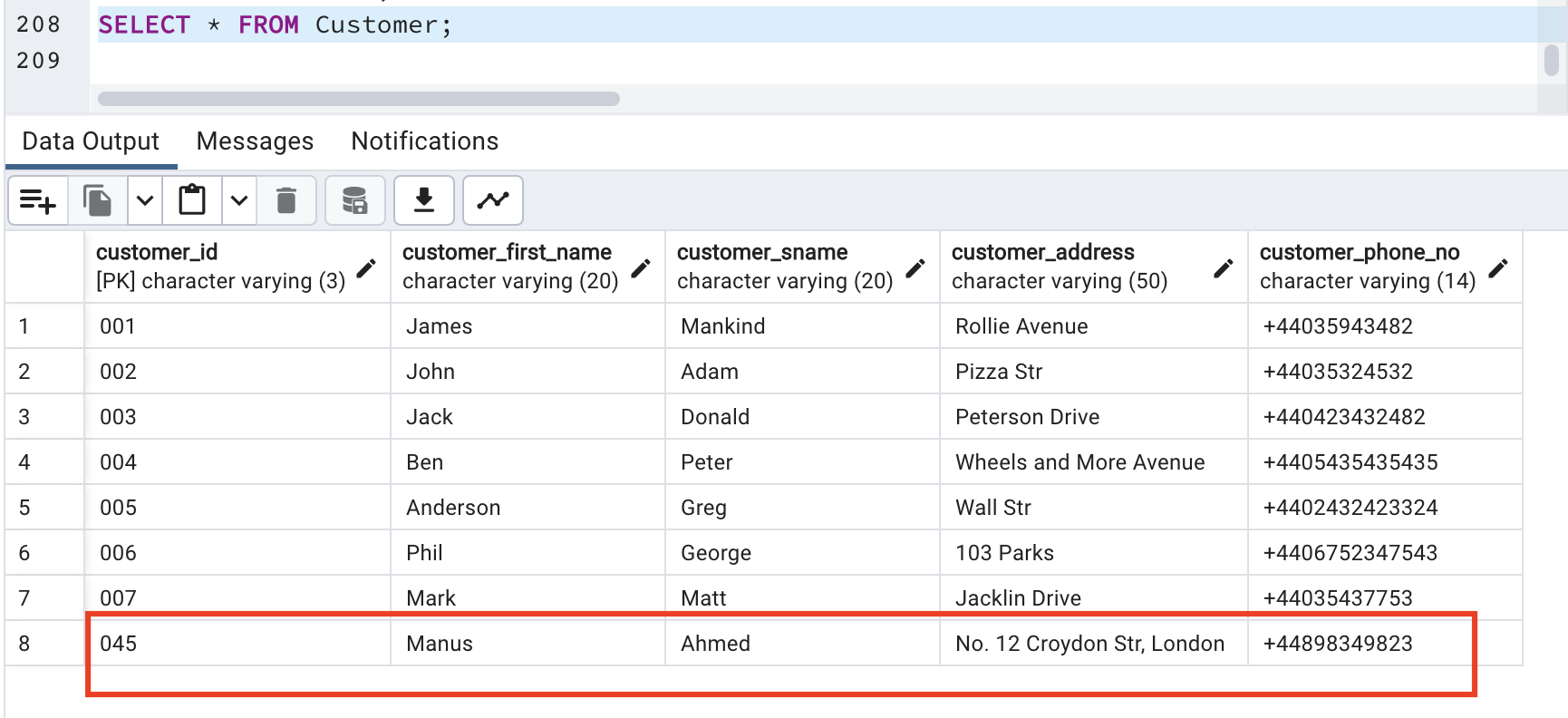
--Checking to See if our Customer and Bank table have been successfully updated.
SELECT * FROM Bank;
SELECT * FROM Customer;
FUNCTION
The next step is to create a function which will generate a 10-digit number that will be used as our transaction ID.
--A function to generate 10 digit numbers which will be used as the transaction ID in the Product purchase with develivery procedure.
DROP FUNCTION IF EXISTS generate_10_digit_number(); --drops the function incase it already exists

CREATE OR REPLACE FUNCTION generate_10_digit_number() -- this is the function name
RETURNS VARCHAR AS $$  -- Returns VARCHAR as the data type
DECLARE
    result VARCHAR := ''; -- this will be an empty string for the result
    counter INTEGER := 0; -- introduces a counter which will be increased incase the random number exists already in the transac table
BEGIN
    LOOP
        EXIT WHEN counter > 1000; -- Sets a limit to avoid infinite loop, this can be any number

        FOR i IN 1..10 LOOP  --loops 10 times for each generated random number.
            result := result || (floor(random() * 10)::INT)::VARCHAR; -- Generates a random number between 0 and 1, multiplies it by 10 to get numbers between 1 and 10
			--cast it to Integer and then to a VARCHAR type.
        END LOOP; --ends the loop

		-- Checks if the generated ID already exists in Transact table
        IF NOT EXISTS (SELECT 1 FROM Transact WHERE Transaction_ID = result) THEN
            EXIT; --exits if it doesn't exist
        ELSE
            result := ''; --if it does assign the resut to an empty string
        END IF;

        counter := counter + 1; --increases the counter and loops again
    END LOOP;

    IF counter > 1000 THEN --if counter is greater than 1000 then raise an exception. That is, after 1000 tries of same random numbers in the transact table
        RAISE EXCEPTION 'Could not generate a unique number within the limit.';
    END IF;--ends the if statement

    RETURN result; --returns the result
END;
$$ LANGUAGE plpgsql;

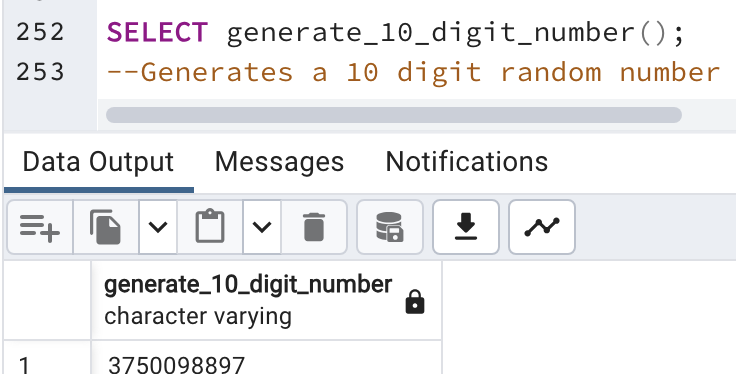
SELECT generate_10_digit_number();
--Generates a 10 digit random number
Another Procedure
Here we have another procedure which will enable customers to make purchases and delivery.
DROP PROCEDURE IF EXISTS ProductPurchaseWithDelivery;
CREATE OR REPLACE PROCEDURE ProductPurchaseWithDelivery(
    ppd_Customer_first_Name VARCHAR,--takes 3 arguments, customers first name, productname and delivery date and time
    ppd_Product_Name VARCHAR,
    ppd_Delivery_Datetime TIMESTAMP
)
AS $$
DECLARE
    Cust_ID VARCHAR; --Declares Cust_ID for customer's ID
    Prod_ID VARCHAR; --Declares Prod_ID to be used for Product ID
    Transac_ID VARCHAR; --Declares Transac_ID to be used for Transaction ID
	Tr_Date TIMESTAMP; --Declares Tr_Date, to be used for Transaction Date
BEGIN
    -- I begin by validating the timestamp.
    BEGIN
        Tr_Date := ppd_Delivery_Datetime::TIMESTAMP; -- This will cast the user input for ppd_Delivery_Datetime to TIMESTAMP and assigns it to Tr_Date
    EXCEPTION
        WHEN others THEN --Creates an exception when there is an error in casting the date/time.
            RAISE EXCEPTION 'Invalid date/time format: %', ppd_Delivery_Datetime; --raises an invalid date-time format exception.
    END;

    -- Fetch Customer ID for the customer first name
    SELECT Customer_id INTO Cust_ID  --selects Customer Id into our declared Cust_ID
    FROM Customer --From the Customer Table
    WHERE Customer_first_name = ppd_Customer_first_Name; --Where Customer's first name on the table is the same as the user's input for ppd_Customer_first_Name

    IF Cust_ID IS NULL THEN --If the user's input name doesn't match and Cust_Id is empty then raise an exception.
        RAISE EXCEPTION 'Customer with name % does not exist', ppd_Customer_first_Name; --Exception here states that the user's customer name does not exist.
    END IF;

    -- Fetching Product ID for the provided product name
    SELECT ProductID INTO Prod_ID --Again we check for error in the Product_ID, by selection the ProductID into Prod_ID
    FROM Product --From our product table
    WHERE Product_Name = ppd_Product_Name; --Where product name is the same as the user's input for ppd_Product_Name

	IF Prod_ID IS NULL THEN --If the user's input name doesn't match and Prod_ID is empty then raise an exception.
        RAISE EXCEPTION 'Product % is not available', ppd_Product_Name; --The user's input for product is not available.
    END IF; --Ends the If statement

    -- Fetching Transaction ID for the provided delivery datetime
    SELECT Transaction_ID INTO Transac_ID --Selects the transaction ID into the Transac_ID.
    FROM Transact --From the Transact Table
    WHERE DateTime = ppd_Delivery_Datetime::TIMESTAMP; --The selection should work, only if the input date and time matches that of the Transact table

    IF Transac_ID IS NULL THEN --If there is no match and the Tansac_ID is empty, raise an exception
        RAISE EXCEPTION 'No matching delivery slot found around %', ppd_Delivery_Datetime::TEXT; --no deleivery found, encodes user's input ppd_Delivery_Datetime to text
    END IF; --ends the if statement


    -- Checks if the product is available in the warehouse
    IF NOT EXISTS (
        SELECT 1 --selects 1 when the condition below is satisfied
        FROM Warehouse_Item --from the warehouse-item table
        INNER JOIN Product ON Warehouse_Item.ProductID = Product.ProductID
		--an inner join of the warehouseitem and product table on ProductID
        WHERE Product.Product_Name = ppd_Product_Name --where product name is the User's input product name ppd_Product_Name
    ) THEN --If nothing is selected
        RAISE EXCEPTION 'Product % is not available in the warehouse', ppd_Product_Name;--raises exception that user's input product does not exist
    END IF; --ends the if statement

    -- If selected then, Insert into Transact if both product and delivery slot are available
    INSERT INTO Transact(Transaction_ID, Customer_ID, DateTime) --Inserts the transactionID, customerID, Datetime
    VALUES (generate_10_digit_number(), Cust_ID, Tr_Date); --the insertion will call on the generate_10_digit_number function created above, then the cust_Id and tr_date which was declared.
END;
$$ LANGUAGE PLPGSQL;
So. now, let us view the transaction table before/after calling the procedure.
BEFORE CALLING THE PROCEDURE
Here, we call the procedure and view the changes.
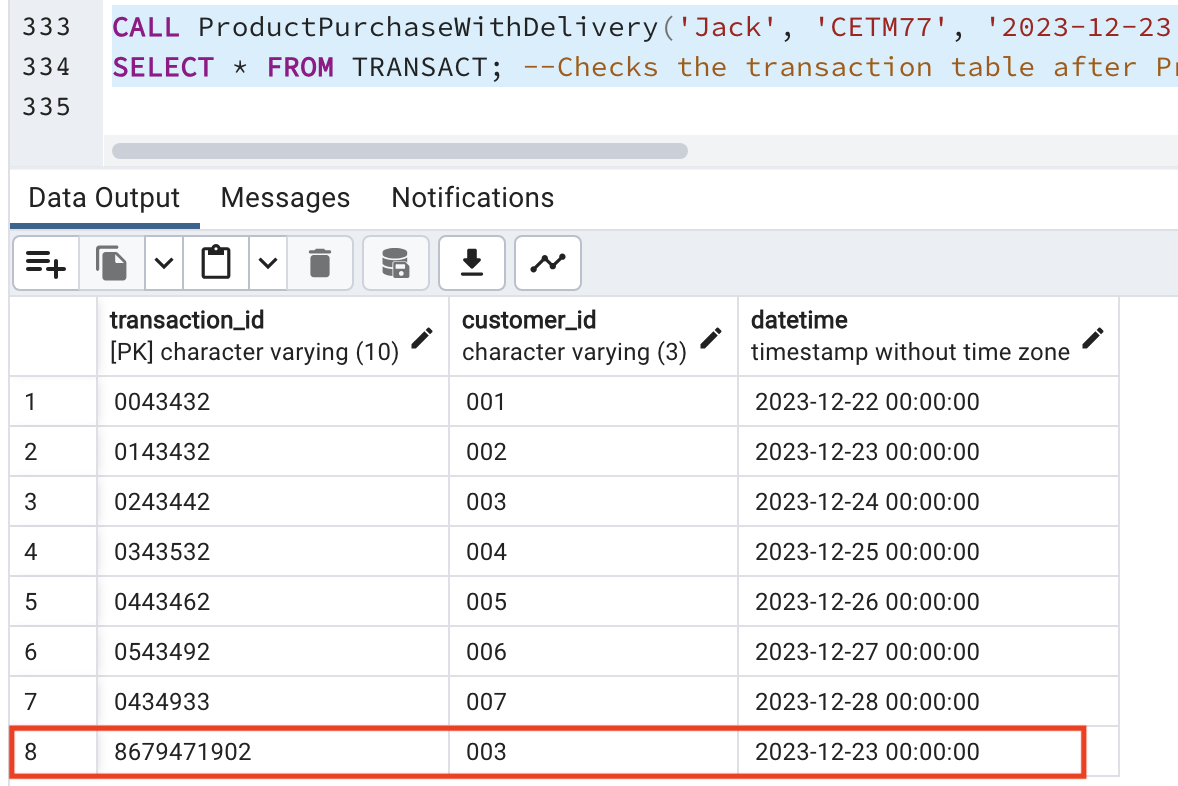
As we can see, the 10 digit random numbers have been assigned. If you go back to the previous table, you will see that the customer with customer_id 003 is Jack Donald.
You can try creating more transactions in the same format.