


NER with SpaCy and Co-Reference Resolution
What is SpaCy? What is NER? What is the en_core_web_sm package?
SpaCy is an open-source Python library specifically designed for advanced Natural Language Processing (NLP) tasks. It provides tools and models to help understand and process human language data, with capabilities like tokenization, part-of-speech tagging, named entity recognition (NER), and more.
What is the en_core_web_sm package? The en_core_web_sm package is a pre-trained language model provided by SpaCy. en stands for "English," the language on which the model is trained. core-web refers to the model's focus on core language processing tasks using web-based data. sm means "small," indicating that it's a lightweight version of the model. It's a faster and less resource-intensive model but comes with fewer parameters and potentially less accuracy than larger models like en_core_web_md (medium) or en_core_web_lg (large).
NER or Named Entity Recognition, is an NLP technique used to identify and classify key entities in a sentence, such as people, organizations, locations, dates, and more. The goal of NER is to extract meaningful real-world entities from text and categorize them into predefined labels (e.g., "PERSON," "ORG," "LOC," "DATE").
Using NER, SpaCy can identify and classify entities:
- Phil →
PERSON - Patrick →
PERSON - Lagos →
GPE(Geopolitical Entity, like a city) - university →
ORG(Organization) - Google →
ORG - January 9th, 2025 →
DATE
This is possible using the ent.label_ attribute in SpaCy. The options include:
1. PERSON: People (e.g., Philip, Victor)
2. CARDINAL: Natural numbers or positive integers. Cardinal means "how many?" (e.g., one, two, 100)
3. NORP: Nationalities or religious/political groups (e.g., Nigerian, American, Christian, Muslim)
4. FAC: Airports, highways, buildings, bridges (e.g., Dubai Mall, Burj Al Arab, Statue of Liberty)
5. ORG: Organizations, agencies, or companies (e.g., Amazon, Facebook, Emaar, RTA)
6. GPE: Countries, states, cities (e.g., United Arab Emirates, Dubai, Lagos)
7. PERCENT: Percentage values with the % sign (e.g., 20%, 30%)
8. LOC: Non-GPE locations like mountains or water bodies
9. QUANTITY: Measurements such as weights and distances (e.g., 50km, 25kg)
10. PRODUCT: Products like phones, food, vehicles, etc. (e.g., Rice, BMW, Mercedes)
11. ORDINAL: Order or rank (e.g., First, Second, Third)
12. EVENT: Events (e.g., Olympics, FIFA) 13. WORK_OF_ART: Books, artworks, or paintings
14. MONEY: Currency values (e.g., 1000 Naira, 500 USD, 200 AED)
15. LAW: Legal documents (e.g., Constitutions)
16. LANGUAGE: Names of languages (e.g., English, French, Arabic)
17. DATE: Dates or periods (e.g., Last Year, June 4th, 2004)
18. TIME: Periods smaller than a day (e.g., 12:00, noon, morning)
Although large language models like GPT-3 and GPT-4 are more effective and diverse, it is good to know that these were the foundations upon which they were built.
In addition, the process where different words or phrases in a text refer to the same thing is called Co-reference Resolution.
For example:
Phil wrote this post, he will write another one.
In this case, "he" refers to Phil.
Now, let's see how we can apply all these using Python.
pip install spacy
python -m spacy download en_core_web_sm
#the above lines will install spacy and the en_core_web_sm model

import spacy

# Now we load the pre-trainedd model
nlp = spacy.load("en_core_web_sm")

sentence =  "Phil and James traveled to Lagos with plans to visit their former university, followed by meeting friends at Google's office on January 9th, 2025"

document = nlp(sentence) #here we call nlp which was previously loaded

#if we intend to get the names of the people in the sentence,  we can try it this way
identified_names = [ent.text for ent in document.ents if ent.label_ ==  "PERSON"]

""" We loop through the documents  that have been already tagged by nlp, if the label is "PERSON', we get the text value . Here, you can replace "PERSON" with any of the 18 attributes as mentioned above."""
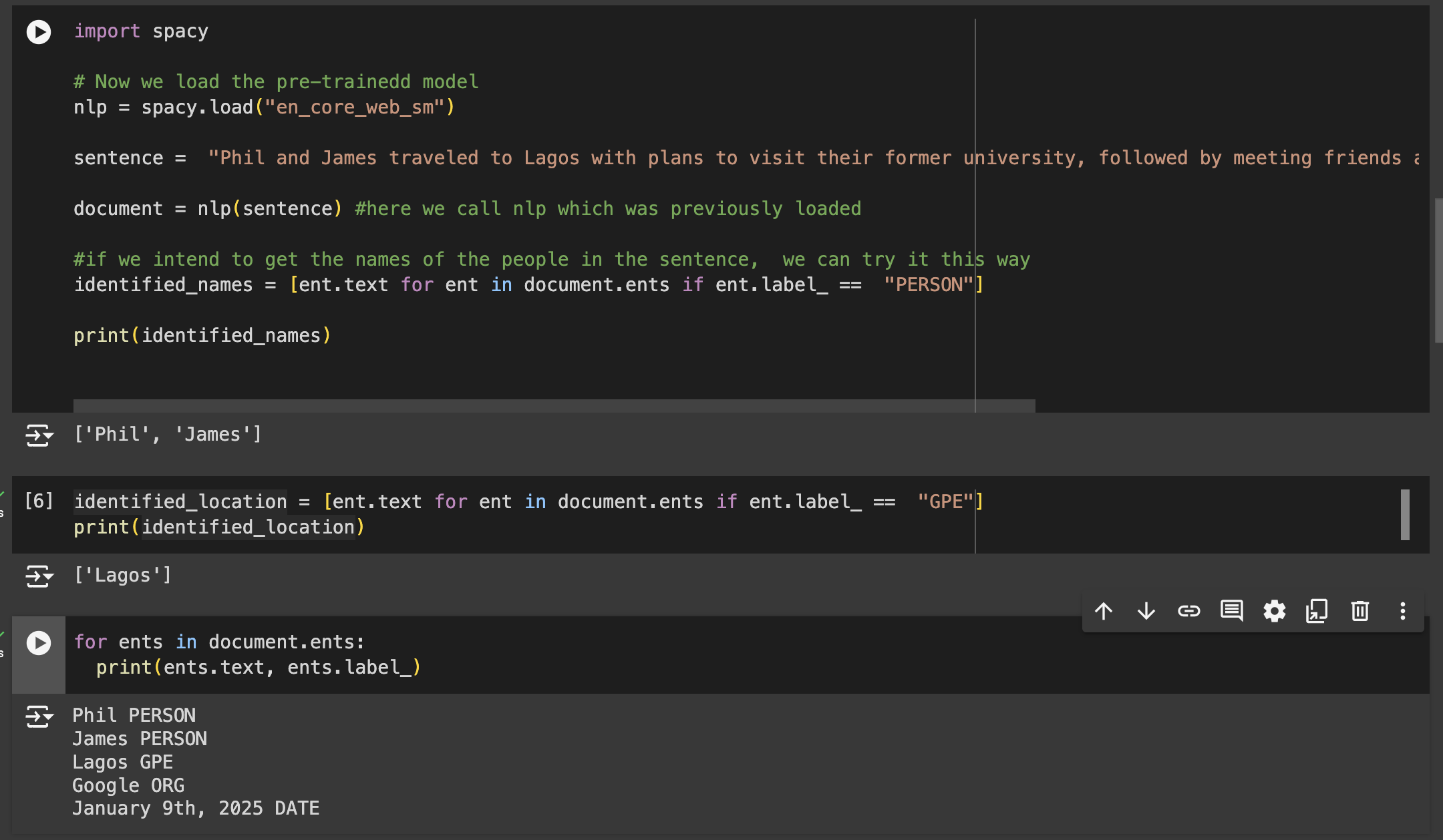
Here's a simple explanation for the code;
Sentences are split into words which we call documents,
Relevant words (documents) are labelled according to the tags that are identified by the en_core_web_sm model. In this case, the relevant words in our sentence are Phil, James, Lagos, Google and January 5th 2025.
Please note: To get accurate results and for better context, we need to split texts into sentences before running the model .
Let's say we have this text, "The fugitives came out of hiding. Pscheidt sent each one of them off with gifts of money, gold objects, food and clothing. Pscheidt operated in a similar fashion in his other factories in the Zagłębie province. In early August 1943, when the Sosnowiec ghetto was liquidated,"
As we can see, the above text contains about 4 different sentences. So how do we split them into 4 different sentences?
To do this effectively, we have to consider several factors.
Our code must be able to handle punctuations like ., !, ?, or even cases of abbreviations like "Mr.", "Dr.".
So, we can decide to write a python code from scractch to do this, ensuring it satisfies the above conditions .or betterstill, allow NLTK to do the heavy lifting.
import nltk
nltk.download('punkt')  # Punk is a tokeniser

from nltk.tokenize import sent_tokenize #Here we are importing the sentence tokenizer from NLTK. Tokenize.

text = "The fugitives came out of hiding. Pscheidt sent each one of them off with gifts of money, gold objects, food and clothing. Pscheidt operated in a similar fashion in his other factories in the Zagłębie province. In early August 1943, when the Sosnowiec ghetto was liquidated,"

sentences = sent_tokenize(text)#convert text into sentences.

#to print our sentences.

for i, sentence in enumerate(sentences):
  print(f"Sentence {i + 1}: {sentence}")

OUTPUT
Sentence 1: The fugitives came out of hiding.
Sentence 2: Pscheidt sent each one of them off with gifts of money, gold objects, food and clothing.
Sentence 3: Pscheidt operated in a similar fashion in his other factories in the Zagłębie province.
Sentence 4: In early August 1943, when the Sosnowiec ghetto was liquidated,
COREFERENCE RESOLUTION
Before LLMs like GPT3 and GPT4, have you ever wondered how computers track and keep up with conversations over time ? Or how chatbots like Siri/Alexa understand pronouns and identify person(s)/object(s) that are being referred to?
Let's take this text as an example.
Phil lives in the UAE. He is open to job offers and collaborations.
In this example, the system is able to understand that the word 'He' refers to 'Phil'.
Anaphora Vs Cataphora
Anaphora occurs after the word it refers to;
- Phil loves to play Fifa, it is one of his best ps5 games.
Cataphora occurs before the word being referred to.
- Despite his love for tennis, Phil prefers to play football.
For more insights on coreference resolution in NLP, visit this page,
I used Coreferee as it performs coreference resolution for English, French, German and Polish languages.
Although, there are other pipelines like FastCoref, NeuralCoref and AllenNLP
This is a very good documentation on coreferee.

# Downgrade spacy to match en-core-web-lg and en-core-web-sm versions
!pip3 install spacy==3.7.2
!python3 -m pip install coreferee
!python3 -m coreferee install en
# install en-core-web-lg and en-core-web-sm after downgrading spaCy
!python3 -m spacy download en_core_web_lg

#!python -m coreferee install en

import coreferee

import spacy
# Load the spaCy model
nlp = spacy.load("en_core_web_lg")

# Add coreference resolution component


nlp.add_pipe("coreferee")

# Example sentence with coreferences
doc = nlp("Phil went to the store. He bought milk for himself and James.")

#Here, you see the chains and how the words have been tagged and their position in a text.
doc._.coref_chains.print()

#This resolves a labeled word using it's location in the text. 5 is the position of the word 'He' which refers to 'Phil'

print(doc._.coref_chains.resolve(doc[5]))


#Gives the position of the words that have been tagged/labeled

for chain in doc._.coref_chains:
  for mention in chain:
    print(mention)


